

To calculate your GPA, multiply each course's grade points by its credits, add up those quality points and divide by the total credits. On the 4.0 scale an A is 4 points, so an A in a 3-credit course gives 12 quality points. The MyPCFile GPA Calculator does this when you type one course per line with its grade and credits. A weighted GPA adds a bonus for harder classes such as AP or IB, and your school decides which classes get it.
In short
- A GPA is the total of grade points times credits for each course, divided by the total credits.
- In our test of the MyPCFile GPA Calculator, five courses worth 55.6 grade points over 17 credits gave a GPA of 3.27.
- Schools score plus and minus grades differently: the tool counts an A- as 3.7, the University of Toledo as 3.67, and the University of California ignores the minus.
- A weighted GPA adds a bonus for harder classes; in Hillsboro School District an A in an AP or IB class counts 5 points instead of 4.
On this page 10 sections
The MyPCFile GPA Calculator turns a list of grades and course credits into a grade point average[1]. You type one course per line and get the result on the usual 4.0 scale[1]. Your school's own rules decide the official number, so treat any calculator result as a check.
Before you start#
For each course, note the letter grade, the credits and, for a weighted GPA, whether it was an honors, AP or IB class. Credits (or credit hours) say how much a course counts, so a 4-credit science class moves your average more than a 2-credit art class. Also look up your school's grading scale in the student handbook. If your grades are only on a paper report card, you can scan the report card with your iPhone to keep a copy, and our guide to counting days between dates helps you plan around an application deadline.
How to calculate GPA by hand#
Each course earns quality points: the grade's point value multiplied by the course's credits[2]. An A worth 4 points in a 3-credit course gives 4 × 3 = 12 quality points[2]. Add up the quality points of all courses, add up their credits, and divide the first total by the second[2][3]. Texas A&M University-Corpus Christi shows the method with four courses: 41 grade points over 13 credit hours give a 3.15 GPA[3].
Here is our own example with five courses, using the grade values of the MyPCFile tool[1].
| Course | Grade | Points per credit | Credits | Quality points |
|---|---|---|---|---|
| English | B+ | 3.3 | 3 | 9.9 |
| Algebra | A- | 3.7 | 4 | 14.8 |
| Chemistry | B | 3.0 | 4 | 12.0 |
| History | A | 4.0 | 3 | 12.0 |
| Spanish | C+ | 2.3 | 3 | 6.9 |
| Total | 17 | 55.6 |
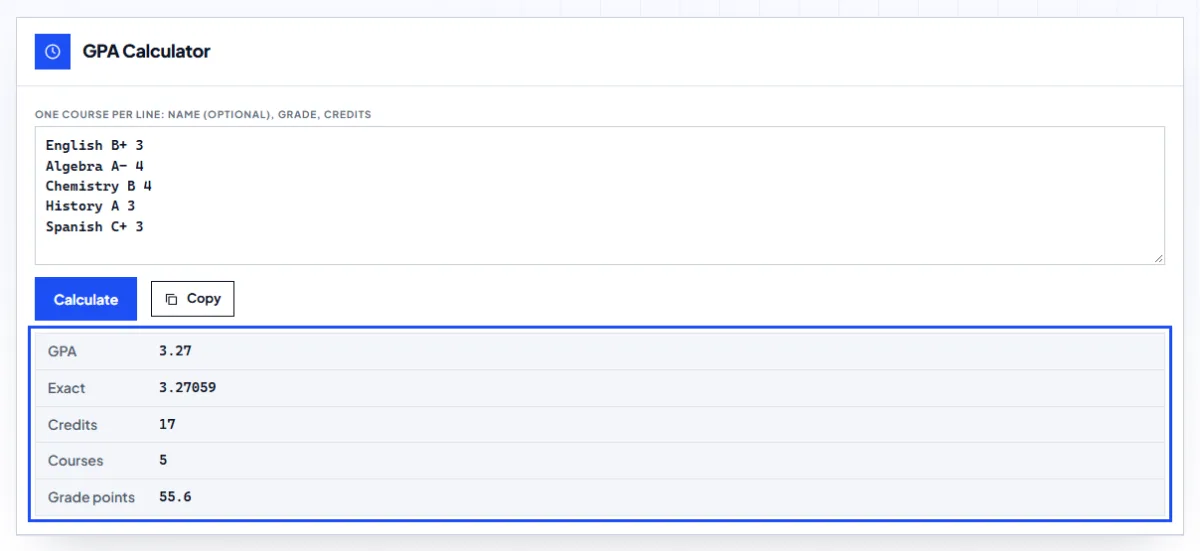
55.6 divided by 17 is 3.27059, or 3.27 rounded to two decimals[1].
How to use the GPA calculator#
Step 1: open the GPA Calculator and clear the example in the course box
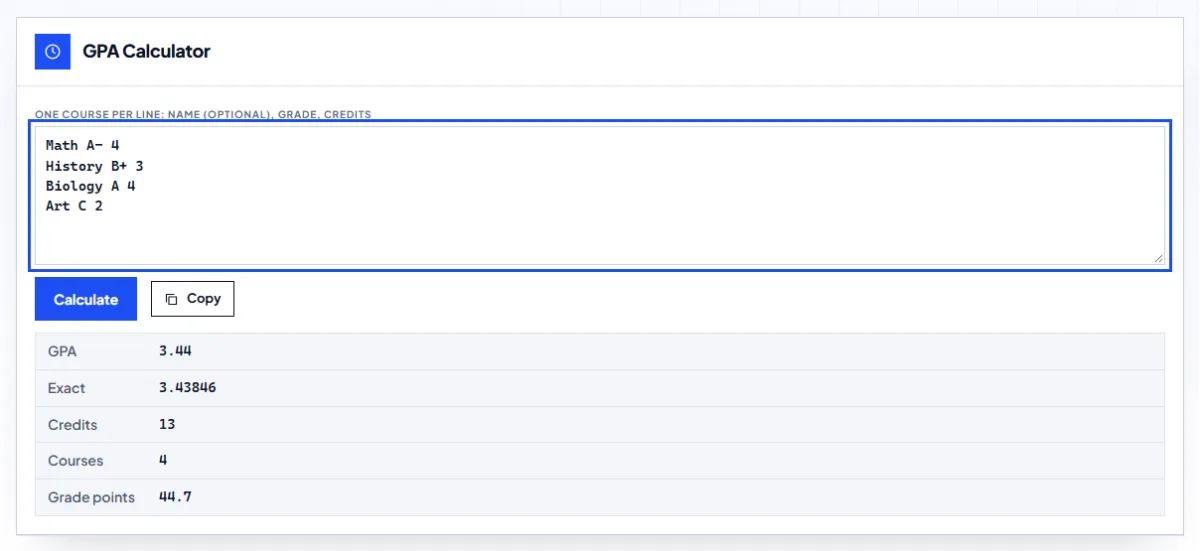
Open the GPA Calculator. The box already holds four example courses with their result, a GPA of 3.44[1]. Select that text and delete it.
Step 2: type one course per line with its grade and credits
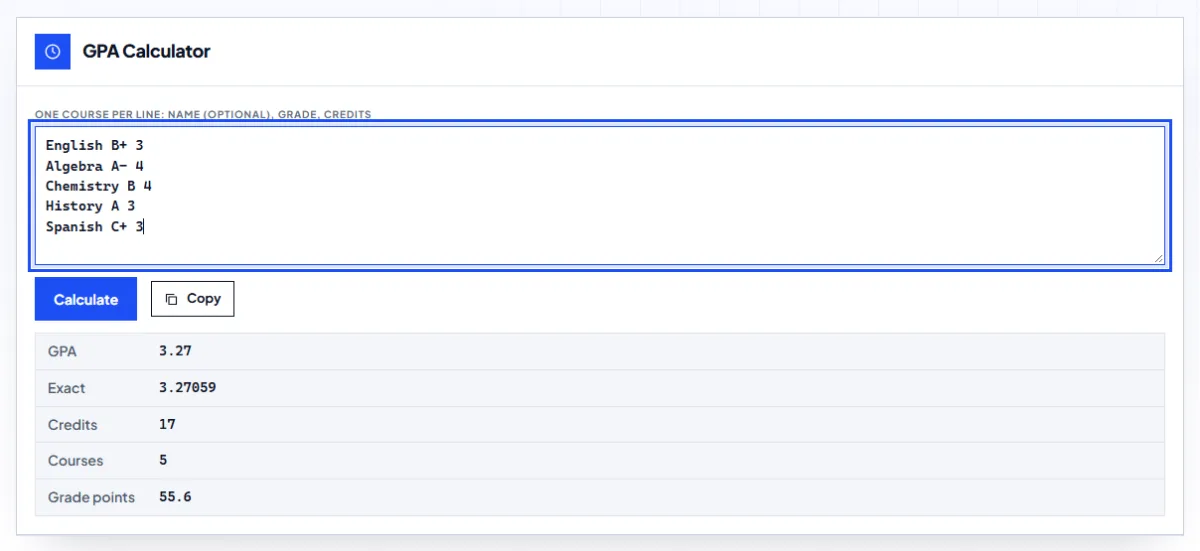
The label above the box reads "One course per line: name (optional), grade, credits"[1]. Separate the parts with spaces, for example English B+ 3. In our test the result changed while we were still typing[1].
Step 3: press Calculate and read the GPA
Press Calculate. For our five courses the panel showed GPA 3.27, Exact 3.27059, Credits 17, Courses 5 and Grade points 55.6, the same as the hand calculation[1]. When we pressed Calculate, the page sent no network request while the result appeared[1].
Step 4: fix a line the calculator rejects
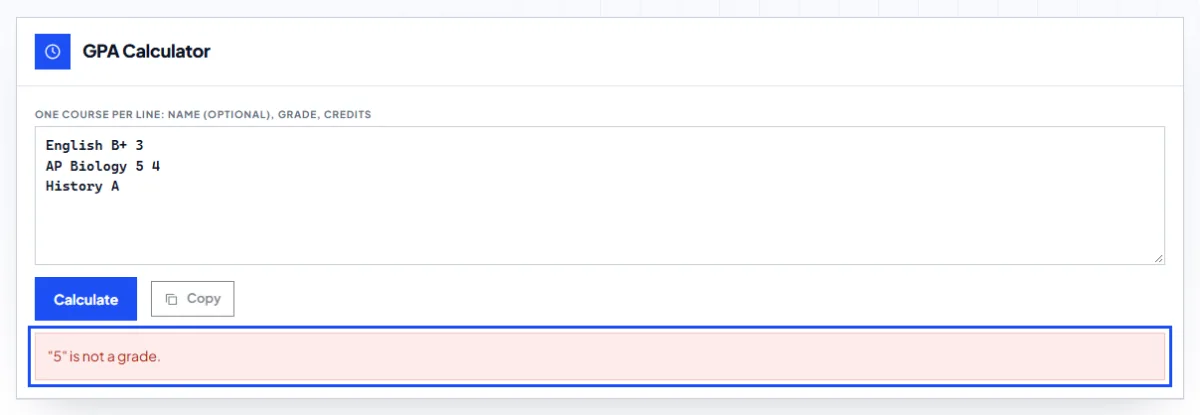
When a line does not fit, a red message takes the place of the result[1]. A 5 typed for an AP class gets the message "5" is not a grade[1]. A line without credits, such as History A, gets a message asking for a grade and credits[1]. Correct the line the message names and press Calculate again.
How letter grades turn into points#
The tool counts A+ and A as 4, A- as 3.7, B+ as 3.3 and so on down to D- at 0.7 and F at 0[1]. Some colleges use thirds of a point: the University of Toledo counts an A- as 3.67 and a B+ as 3.33[4]. The University of California's admission GPA ignores pluses and minuses and uses A = 4, B = 3, C = 2 and D = 1[5].
| Grade | MyPCFile tool (points) | University of Toledo (points) | UC admission GPA (points) |
|---|---|---|---|
| A- | 3.7 | 3.67 | 4 |
| B+ | 3.3 | 3.33 | 3 |
| B- | 2.7 | 2.67 | 3 |
| C+ | 2.3 | 2.33 | 2 |
The tool and Toledo differ by 0.03 for these grades, so a result from the tool can differ slightly from a transcript that uses thirds. Trust the scale your school prints.
Weighted GPA vs unweighted GPA#
An unweighted GPA treats every class alike, with A = 4, B = 3, C = 2 and D = 1 points[6]. A weighted GPA adds a bonus to the grade points of harder classes[6]. AP stands for Advanced Placement and IB for International Baccalaureate, and each school or district decides which of these courses, and which honors classes, earn the bonus.
Hillsboro School District weights only AP and IB courses, and an A in such a class counts 5 points instead of 4[6]. In its example the same four grades come to 3.25 unweighted and 3.75 weighted[6]. Broward County Public Schools add one quality point per full credit for honors courses[7], though not for a grade below C[7]. The University of California adds one point for each semester of an approved honors-level course, up to 8 points across 10th and 11th grade[5].
The MyPCFile tool refused both a 5 and a 4.5 in our test[1], so it gives you the unweighted GPA. For a weighted one, add the bonus to its Grade points line yourself. If your school adds one point per credit for AP and the Chemistry course above was AP, the result is (55.6 + 4) ÷ 17 = 3.51. Hillsboro's example divides by the number of classes instead of credits[6], so check how your school counts first.
Using it as a college GPA calculator: semester and cumulative#
A semester GPA covers one term, and a cumulative GPA covers every term so far. Notre Dame divides one term's quality points by its credit hours attempted for the semester GPA[2] and uses the totals from all terms for the cumulative GPA[2].
For a semester GPA, enter only that term's courses. For a cumulative GPA, enter every course, or put your earlier GPA and its credits on one line as a number. In our test, the line Earlier terms 3.25 30 plus English B+ 3 and Algebra A- 4 gave a GPA of 3.3 over 37 credits[1]. The shortcut is right only when those 30 credits are the ones your earlier GPA was based on.
Some marks never enter the average: at the University of Toledo, grades such as W and IN are left out[4], so leave those courses out of the tool too. Rounding varies as well. RPI cuts its GPAs after two decimal places[8], and UC tells applicants not to round[5], which is when the tool's Exact line helps[1].
If it does not work#
- The message asks for a grade and credits: add the credits at the end of that line[1].
- The message says a number is not a grade: type the letter grade, since weighted values such as 5 or 4.5 are refused[1].
- The GPA differs from your transcript: compare the grade values with your school's scale[1][4] and check whether your school truncates instead of rounding[8].
Summary: which GPA number to use#
For a quick unweighted GPA, type your courses into the GPA Calculator and read the GPA line, which follows the grade points times credits method registrars publish[1][2]. For a weighted GPA, add your school's bonus to the Grade points total yourself. For an application, the number that counts is the one your school or the college works out; UC, for example, calculates its own GPA from your application[5].
Frequently asked questions
How do I calculate my GPA with credits?
Multiply each course's grade points by its credits to get quality points[2]. Add the quality points of all courses, then divide by the total credits[2][3]. On the MyPCFile scale a B+ is 3.3 and an A is 4.0[1], so a B+ in a 3-credit class and an A in a 4-credit class give (9.9 + 16) ÷ 7 = 3.70. A course with more credits moves the result more, so a low grade in a big course costs more than one in a small course.
How do I calculate my cumulative college GPA?
Divide the quality points from all terms by the credit hours attempted in all terms[2]. In the MyPCFile GPA Calculator you can type every course, or put your earlier GPA and its credits on one line as a number. In our test, Earlier terms 3.25 30 with two new courses gave a GPA of 3.3 over 37 credits[1]. At the University of Toledo, grades such as W are not counted[4].
Sources
Numbers in square brackets in the text point to these sources.
- 1 GPA CalculatorMyPCFile · accessed Nov 28, 2026mypcfile.com
- 2 Calculate GPAUniversity of Notre Dame, Office of the Registrar · accessed Nov 28, 2026registrar.nd.edu
- 3 Calculate Your GPATexas A&M University-Corpus Christi, Registrar · accessed Nov 28, 2026tamucc.edu
- 4 Calculating Your GPAThe University of Toledo, Office of the Registrar · published Sep 14, 2026 · accessed Nov 28, 2026utoledo.edu
- 5 GPA requirementUniversity of California, UC Admissions · accessed Nov 28, 2026admission.universityofcalifornia.edu
- 6 Weighted GradesHillsboro School District · accessed Nov 28, 2026catalog.hsd.k12.or.us
- 7 High School Grading & Grade Point AveragesBroward County Public Schools · accessed Nov 28, 2026browardschools.com
- 8 GPA CalculationRensselaer Polytechnic Institute, Office of the Registrar · accessed Nov 28, 2026registrar.rpi.edu