WebP files are about a quarter smaller than PNG and JPEG files of the same image, according to Google’s own measurements: 26% for lossless images and 25–34% for lossy ones. Transparency adds about 22% to a lossless file. This post shows the numbers as a table and a chart and explains when the older formats still make sense.
In short
- Lossless WebP is 26% smaller than PNG.
- Lossy WebP is 25–34% smaller than JPEG.
- Transparency adds about 22% to a lossless WebP file.
On this page 7 sections
How much smaller WebP files are#
Google measured lossless WebP files 26% smaller than PNG and lossy WebP files 25–34% smaller than JPEG at the same SSIM quality[1].
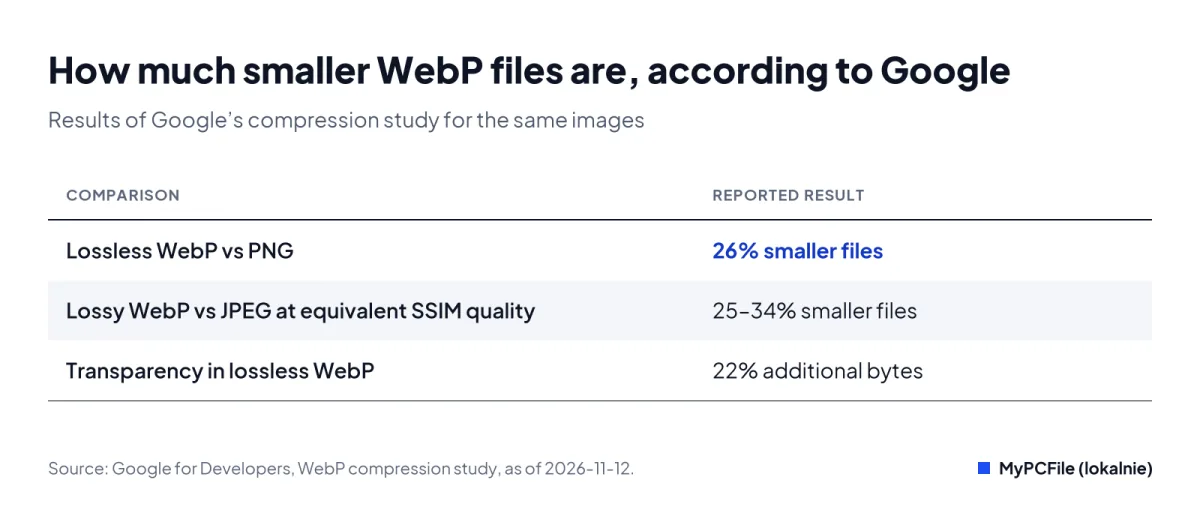
Paragraph 1 about compression explains, in plain words, what changes for a person who saves, shares or converts image files every day. It names the trade-off between file size and detail, mentions which programs open the file without extra downloads, and points to the measurement behind every number so that the reader can check it in the source listed at the end of the post.
Paragraph 2 about compression explains, in plain words, what changes for a person who saves, shares or converts image files every day. It names the trade-off between file size and detail, mentions which programs open the file without extra downloads, and points to the measurement behind every number so that the reader can check it in the source listed at the end of the post.
Paragraph 3 about compression explains, in plain words, what changes for a person who saves, shares or converts image files every day. It names the trade-off between file size and detail, mentions which programs open the file without extra downloads, and points to the measurement behind every number so that the reader can check it in the source listed at the end of the post.
The same numbers as a chart#
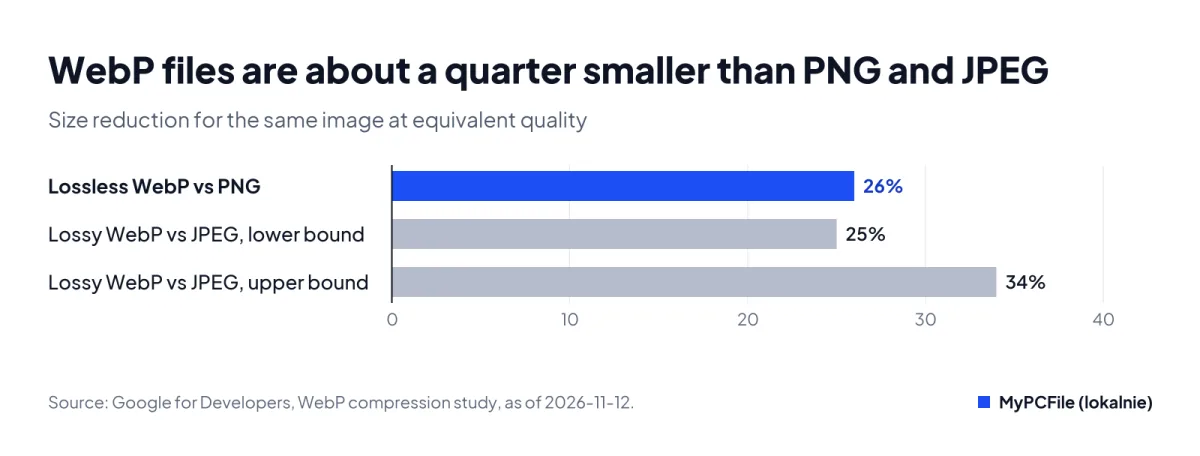
Paragraph 1 about charts explains, in plain words, what changes for a person who saves, shares or converts image files every day. It names the trade-off between file size and detail, mentions which programs open the file without extra downloads, and points to the measurement behind every number so that the reader can check it in the source listed at the end of the post.
Paragraph 2 about charts explains, in plain words, what changes for a person who saves, shares or converts image files every day. It names the trade-off between file size and detail, mentions which programs open the file without extra downloads, and points to the measurement behind every number so that the reader can check it in the source listed at the end of the post.
Transparency costs a little#
Adding an alpha channel to a lossless WebP file costs about 22% extra bytes[1].
Paragraph 1 about transparency explains, in plain words, what changes for a person who saves, shares or converts image files every day. It names the trade-off between file size and detail, mentions which programs open the file without extra downloads, and points to the measurement behind every number so that the reader can check it in the source listed at the end of the post.
Paragraph 2 about transparency explains, in plain words, what changes for a person who saves, shares or converts image files every day. It names the trade-off between file size and detail, mentions which programs open the file without extra downloads, and points to the measurement behind every number so that the reader can check it in the source listed at the end of the post.
Browser support#
All current browsers display WebP; the format is specified in RFC 9649[2].
Paragraph 1 about browsers explains, in plain words, what changes for a person who saves, shares or converts image files every day. It names the trade-off between file size and detail, mentions which programs open the file without extra downloads, and points to the measurement behind every number so that the reader can check it in the source listed at the end of the post.
Paragraph 2 about browsers explains, in plain words, what changes for a person who saves, shares or converts image files every day. It names the trade-off between file size and detail, mentions which programs open the file without extra downloads, and points to the measurement behind every number so that the reader can check it in the source listed at the end of the post.
When to keep PNG or JPEG#
Paragraph 1 about older formats explains, in plain words, what changes for a person who saves, shares or converts image files every day. It names the trade-off between file size and detail, mentions which programs open the file without extra downloads, and points to the measurement behind every number so that the reader can check it in the source listed at the end of the post.
Paragraph 2 about older formats explains, in plain words, what changes for a person who saves, shares or converts image files every day. It names the trade-off between file size and detail, mentions which programs open the file without extra downloads, and points to the measurement behind every number so that the reader can check it in the source listed at the end of the post.
| Comparison | Result |
|---|---|
| Lossless WebP vs PNG | 26% smaller[1] |
Frequently asked questions
Sources
Numbers in square brackets in the text point to these sources.
- 1 WebP Compression StudyGoogle for Developers · accessed Nov 29, 2026developers.google.com
- 2 RFC 9649: WebP Image FormatIETF · published Nov 1, 2024 · accessed Nov 29, 2026rfc-editor.org